The Concierge Desk as the Hotel’s Guest-Service Command Center
A well-equipped concierge desk is more than a polished counter with a telephone and a stack of local maps. It is a working service hub where guest questions become reservations, transportation requests become confirmed pickups, misplaced belongings are documented, special occasions are coordinated, and dozens of small problems are solved before they affect the stay. The best hotel concierge supplies support speed, accuracy, discretion, accessibility, and consistent service across every shift.
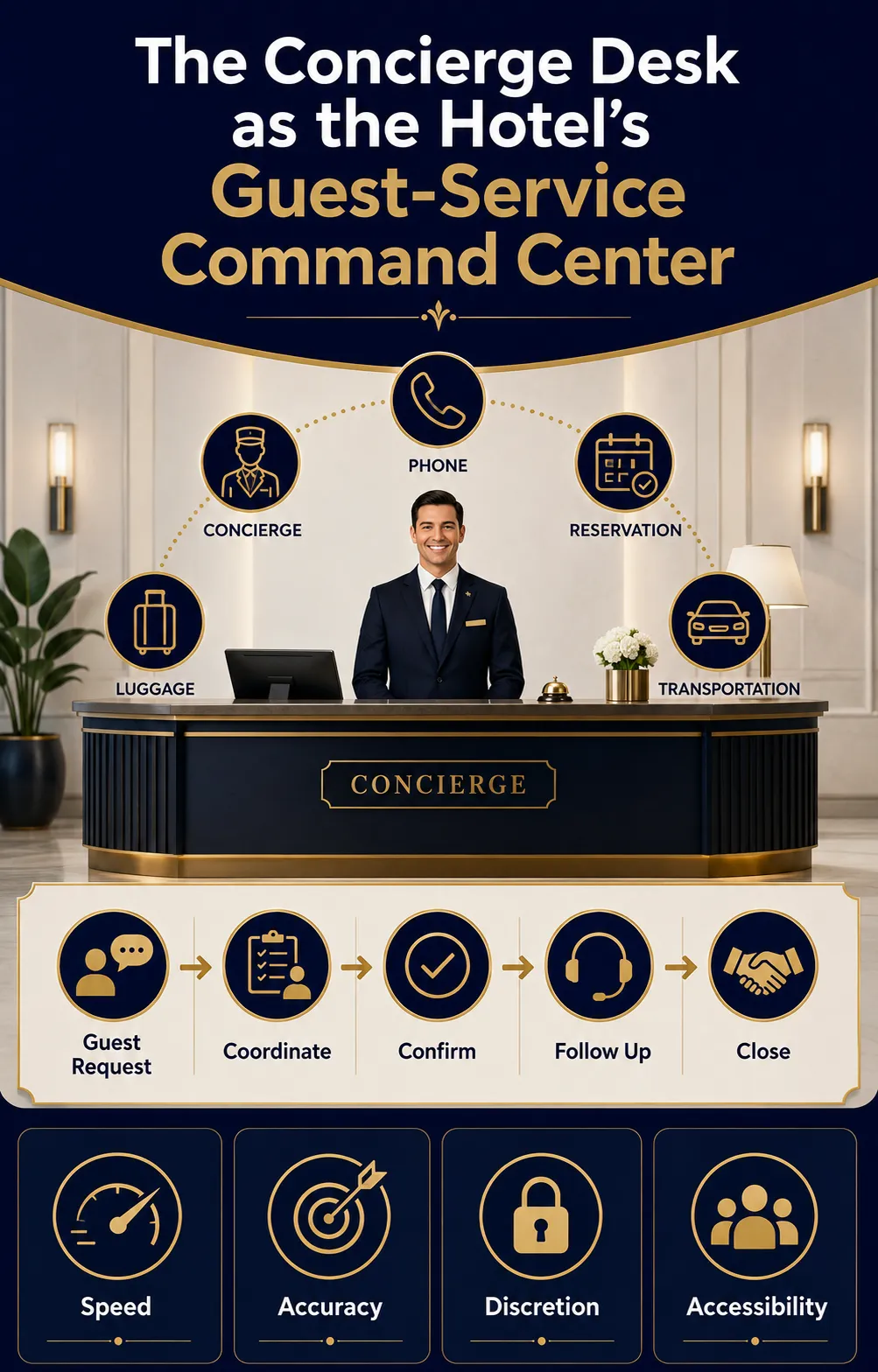
The essential setup normally includes a functional workstation, reliable communication equipment, a computer with approved hotel systems, printing and scanning capability, secure storage, current destination information, guest loaner items, baggage-management supplies, accessible communication tools, emergency references, and carefully controlled consumables. The exact mix depends on the property. A 70-room boutique hotel does not need the same equipment quantity as a convention resort with multiple towers, but both need a deliberate system rather than an improvised collection of items.
Procurement should begin with the services the desk is expected to deliver. If the concierge books restaurants, attractions, tours, airport transfers, and private transportation, the station must support those transactions from request through confirmation and follow-up. If bell, valet, package, and luggage services also report through the desk, the checklist must expand to include claim checks, carts, tags, storage controls, and dispatch tools. Supplies should follow the workflow—not the other way around.
This guide organizes the complete concierge station into practical purchasing categories and explains how to specify, stock, secure, test, and replenish them. The result is a desk that looks calm to guests because the operational complexity behind it has been properly planned.
Get a Custom Hotel Concierge Supply Plan
Planning a new concierge desk? Send us your property type, room count, opening date, and required services to receive a tailored supply list.
Request Your Tailored Supply List
How to Build a Property-Specific Concierge Supply Checklist
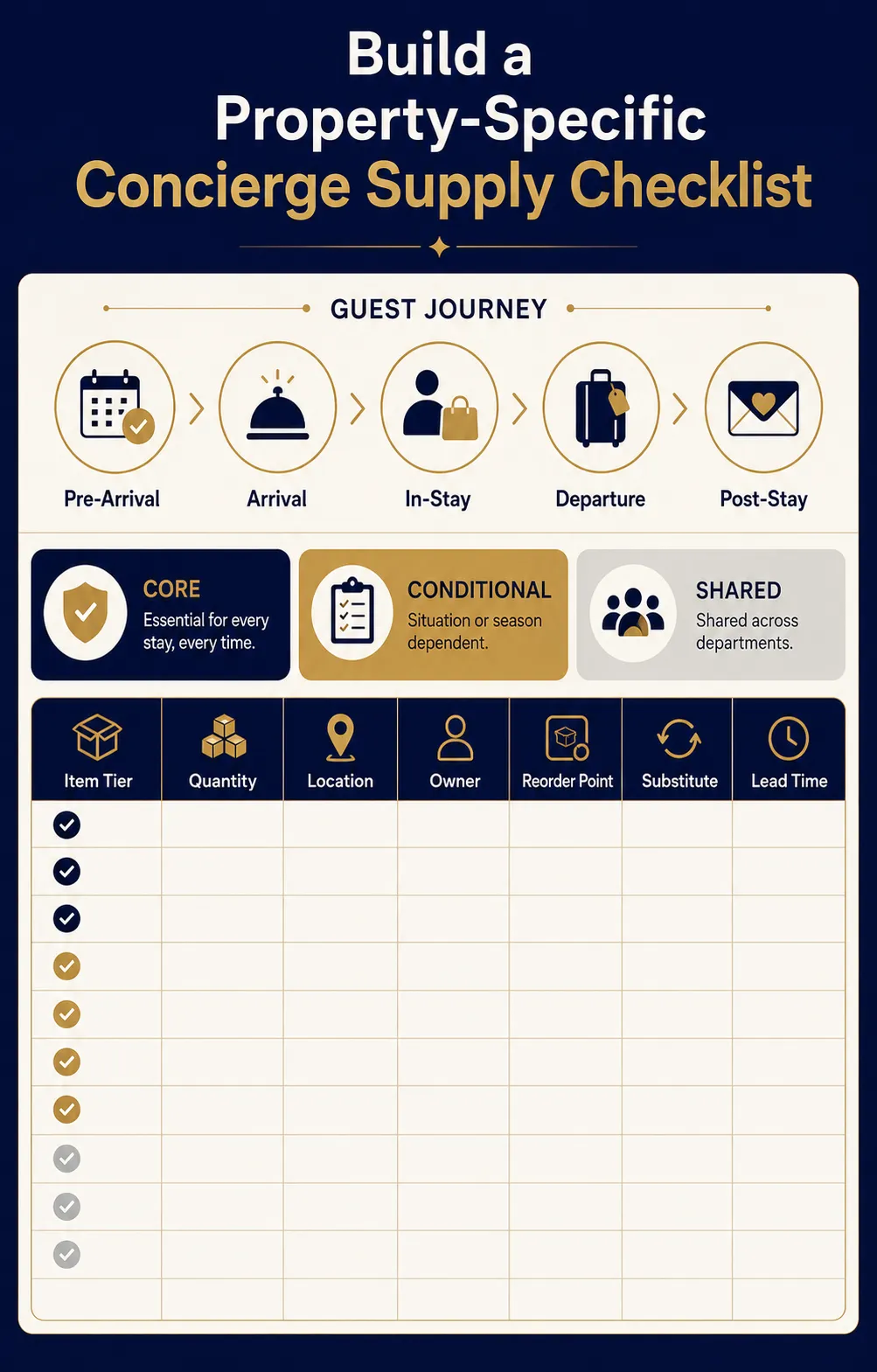
Start by defining the concierge function in writing. List every request the team may accept, what the concierge can complete directly, what must be transferred to another department, and what requires management approval. This prevents unnecessary purchases and exposes missing tools before opening day.
Map the workload across the guest journey: pre-arrival planning, arrival assistance, in-stay requests, departure transportation, and post-stay follow-up. Then estimate transaction volume using room count, occupancy patterns, guest profile, average length of stay, local demand, event schedules, and desk operating hours. A resort that loans umbrellas and sports equipment needs different storage than an urban hotel that handles theater tickets and restaurant reservations.
Divide every potential item into three levels:
- Core: required for routine service on every staffed shift.
- Conditional: needed because of the property’s location, amenities, guest segments, or service promise.
- Shared: owned by another department but available to concierge staff through a documented handoff.
The final checklist should also identify quantity, storage location, owner, reorder point, approved substitute, cleaning method, warranty, and replacement lead time. Avoid buying equipment solely because another hotel uses it. A device is valuable only when it supports an approved workflow, integrates with existing systems, fits the physical desk, and can be maintained by the property.
Concierge Desk Furniture, Workstations, and Guest-Facing Presentation
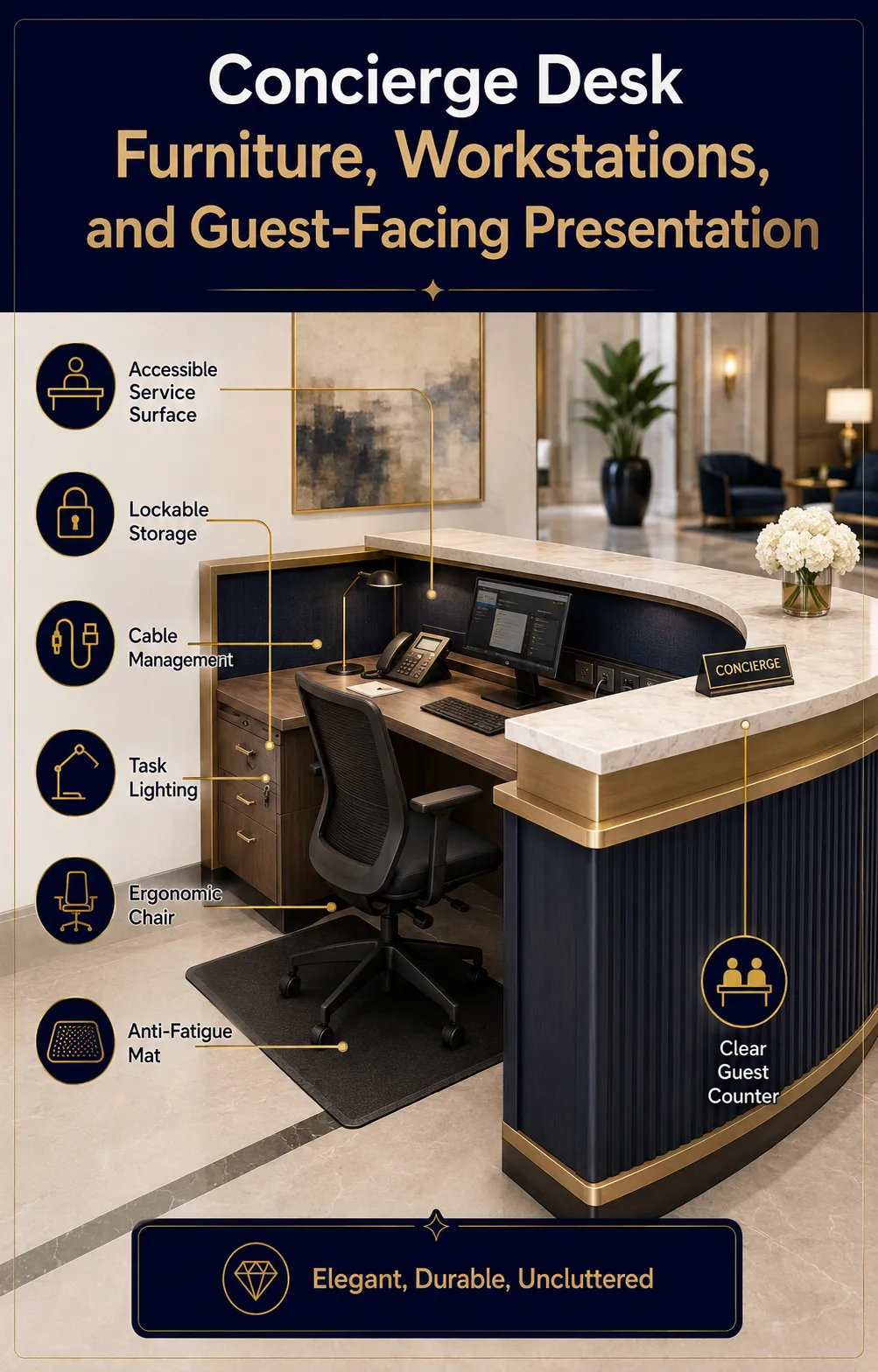
The concierge counter must serve two audiences at once: guests expect an elegant, uncluttered point of contact, while employees need a durable, ergonomic workstation. Specify commercial-grade millwork or furniture with cable management, ventilated equipment compartments, lockable drawers, adjustable shelving, task lighting, and surfaces that tolerate frequent cleaning. The finish should coordinate with the lobby without sacrificing repairability.
Provide an accessible service surface and an unobstructed approach that complies with the requirements applicable to the property. Guests using wheelchairs should be able to approach, exchange documents, sign forms, and converse comfortably. Do not block the accessible section with brochure displays, décor, bags, or temporary signs. Consider seated guests, people of short stature, and anyone who needs extra time or privacy.
Behind the counter, include an adjustable chair or sit-stand option, an anti-fatigue mat where employees stand for long periods, a monitor arm, an easy-to-clean keyboard area, and sufficient knee clearance. Frequently used items should remain within comfortable reach; heavy paper cartons, spare equipment, and bulk stock belong in lower or separate storage.
Guest-facing presentation supplies may include a restrained desk sign, nameplates, a business-card holder, a small brochure display, and a discreet writing set. Choose stable holders with rounded edges and enough weight to resist accidental movement. Keep decoration minimal so guests can immediately identify where to stand and where to place a phone, map, or document. A beautiful desk that cannot support a real transaction is decorative furniture, not operational equipment.
Computers, Telephones, Printers, Connectivity, and Power Equipment
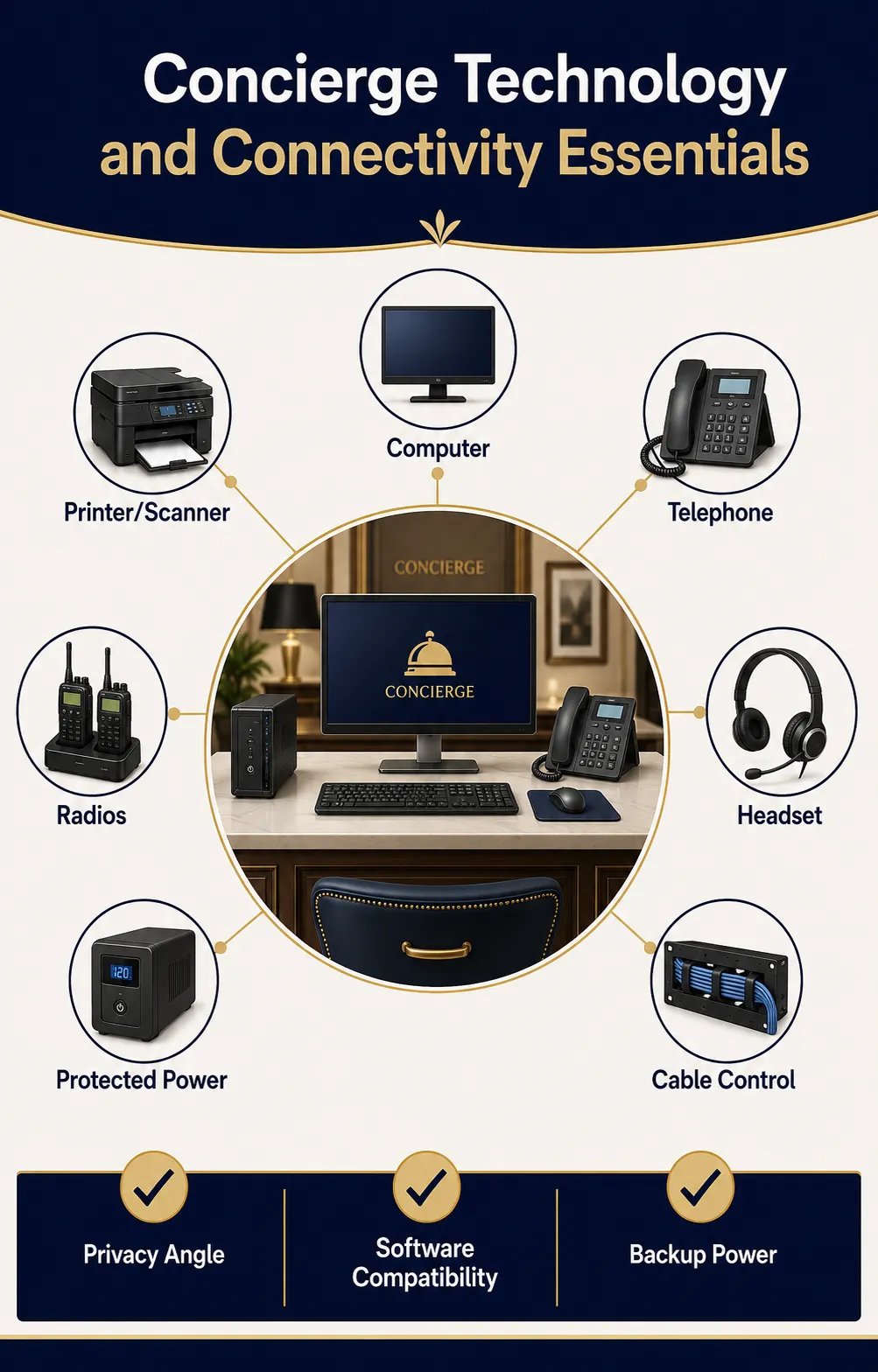
The technology package should be standardized with the hotel’s approved hardware environment. At minimum, most concierge stations need a business-grade computer, commercial monitor, keyboard, mouse, telephone or softphone headset, multifunction printer or nearby shared printer, scanner capability, and protected power. Select equipment based on actual transaction volume rather than consumer features.
The computer should have enough screen space to compare schedules, confirm reservations, update a guest request, and communicate with a vendor without constantly hiding windows. A second monitor can be useful at high-volume desks, but only when the counter depth and privacy angle are appropriate. Position screens so passersby cannot casually view guest names, room numbers, itineraries, or payment details. Privacy filters may be appropriate in exposed locations.
Choose a printer that supports the documents the desk really produces: confirmations, itineraries, boarding documents, maps, vouchers, receipts, and internal reports. Stock the correct paper, toner or ink, labels, and cleaning supplies. If tickets, luggage tags, or narrow receipts are printed frequently, a dedicated thermal or label printer may be more efficient than using full-size sheets. Confirm software compatibility before purchase.
Telephone equipment should provide clear audio, programmable internal contacts, call transfer, hold, voicemail, and an approved method for recording request details. Discreet headsets can reduce lobby noise, although shared headsets require hygienic earpiece management. Large properties may also need two-way radios, earpieces, spare batteries, a multi-unit charger, and verified coverage in the lobby, entrances, luggage room, loading areas, parking zones, and elevators.
Complete the setup with surge protection, managed power strips, cable labels, secure device mounts, spare approved charging cables, and battery backup for essential networking or communication equipment where justified. Guest charging should use purpose-built, tamper-resistant equipment rather than loose personal chargers of unknown condition.
Concierge Software, Booking Tools, and Guest-Request Management Systems
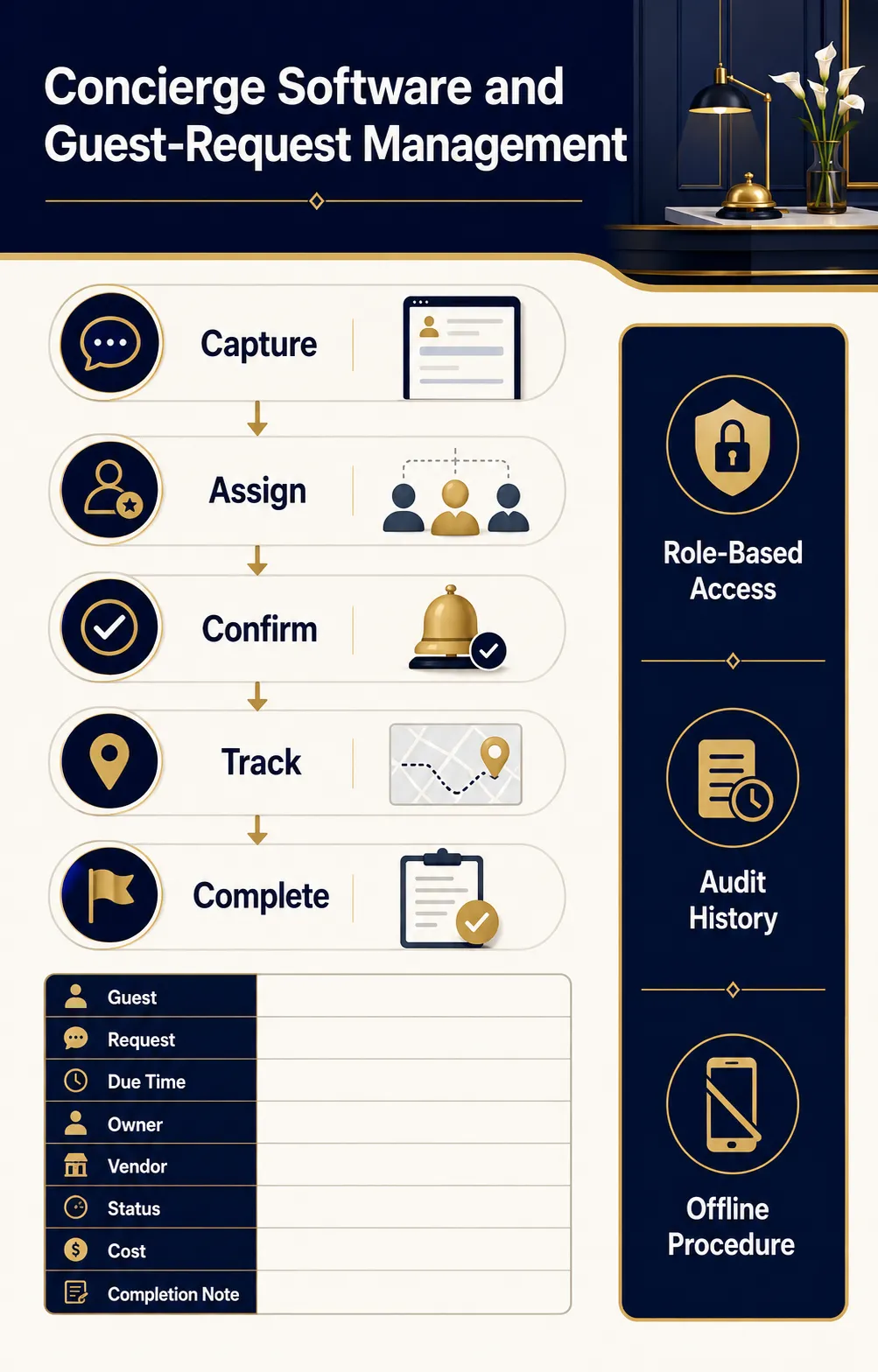
Physical supplies are only effective when the information workflow is equally organized. Concierge staff typically need role-based access to the property-management system, guest-request platform, approved messaging channels, restaurant and activity booking tools, transportation contacts, email, internal knowledge base, and shift-handoff records. The system should capture requests made in person, by telephone, through messaging, or through another department without creating separate queues that employees must reconcile manually.
For each request, the platform should record the guest, contact preference, request details, promised time, assigned owner, status, vendor confirmation, cost or cancellation condition, and completion note. Escalation rules are important: an unanswered restaurant inquiry is not the same as a missed airport transfer or an accessibility request. High-risk and time-sensitive tasks need visible deadlines and backup ownership.
Evaluate software for integration, usability, reporting, multilingual communication, permission controls, audit history, mobile access, offline procedures, and vendor support. Avoid adding a stand-alone digital concierge merely because it has an attractive interface. It should reduce duplicate entry and support the human team, not create another inbox that nobody consistently monitors.
Build templates for common replies, but preserve room for personal judgment. Directions, opening hours, dress codes, cancellation terms, and transportation instructions should be easy to update centrally. Never assume an automated recommendation is current or appropriate; employees should verify details that can change quickly.
Every workstation also needs a downtime kit: current internal extensions, critical vendor numbers, blank request forms, transportation logs, emergency contacts, and a method for entering pending requests when systems return. Technology makes service faster, but resilience keeps the desk functional when technology is unavailable.
Stationery, Forms, Tickets, Vouchers, and Transaction Supplies
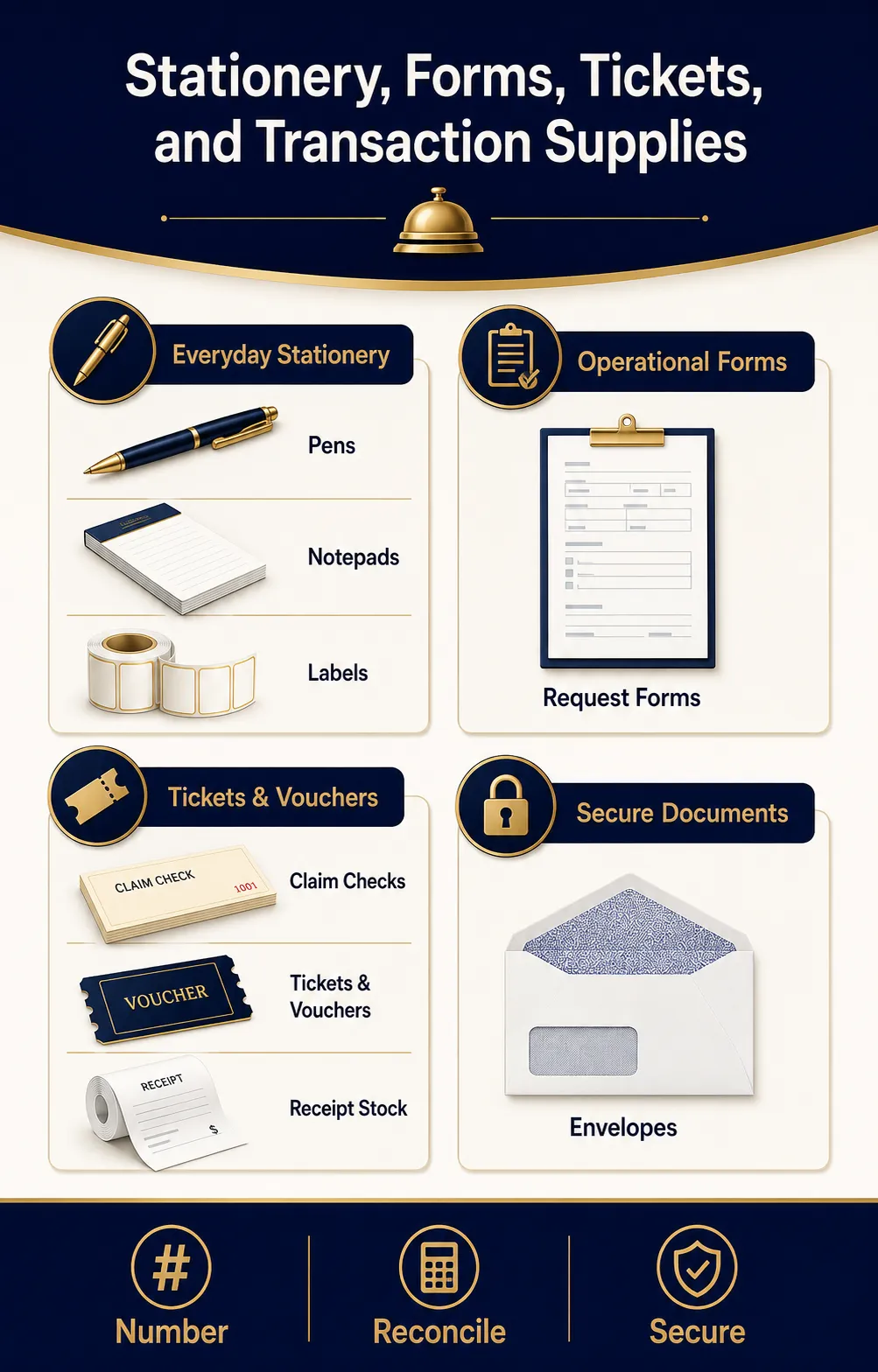
Routine office materials should be standardized, neatly stored, and replenished before the final package is opened. A practical supply set includes black and blue pens, pencils, permanent and dry-erase markers, highlighters, notepads, sticky notes, paper clips, binder clips, staplers, staples, a staple remover, scissors, tape, a ruler, rubber bands, folders, envelopes, printer paper, card stock, and approved labels. Choose reliable commercial products and avoid overfilling drawers with rarely used variations.
Operational forms may include guest-request sheets, restaurant and transportation confirmations, package or baggage records, loaner-item agreements, lost-and-found intake forms, incident referral sheets, cash or voucher logs, vendor contact updates, and shift-handoff checklists. Whenever possible, use controlled digital forms; retain paper versions for downtime and specific transactions that require them.
Ticketing supplies can include blank voucher stock, receipt rolls, attraction envelopes, ticket wallets, perforated claim checks, and secure storage for preissued materials. Numbered documents should be inventoried and reconciled. Never leave live tickets, signed forms, payment slips, or guest itineraries exposed on the counter.
Printed materials should carry current branding and only the information that remains useful for the expected life of the stock. Avoid ordering large quantities of pieces containing prices, schedules, QR codes, or partner information likely to change. A smaller controlled print run may cost more per unit but prevent waste and embarrassing misinformation.
Local Information, Maps, Directories, Menus, and Destination Resources
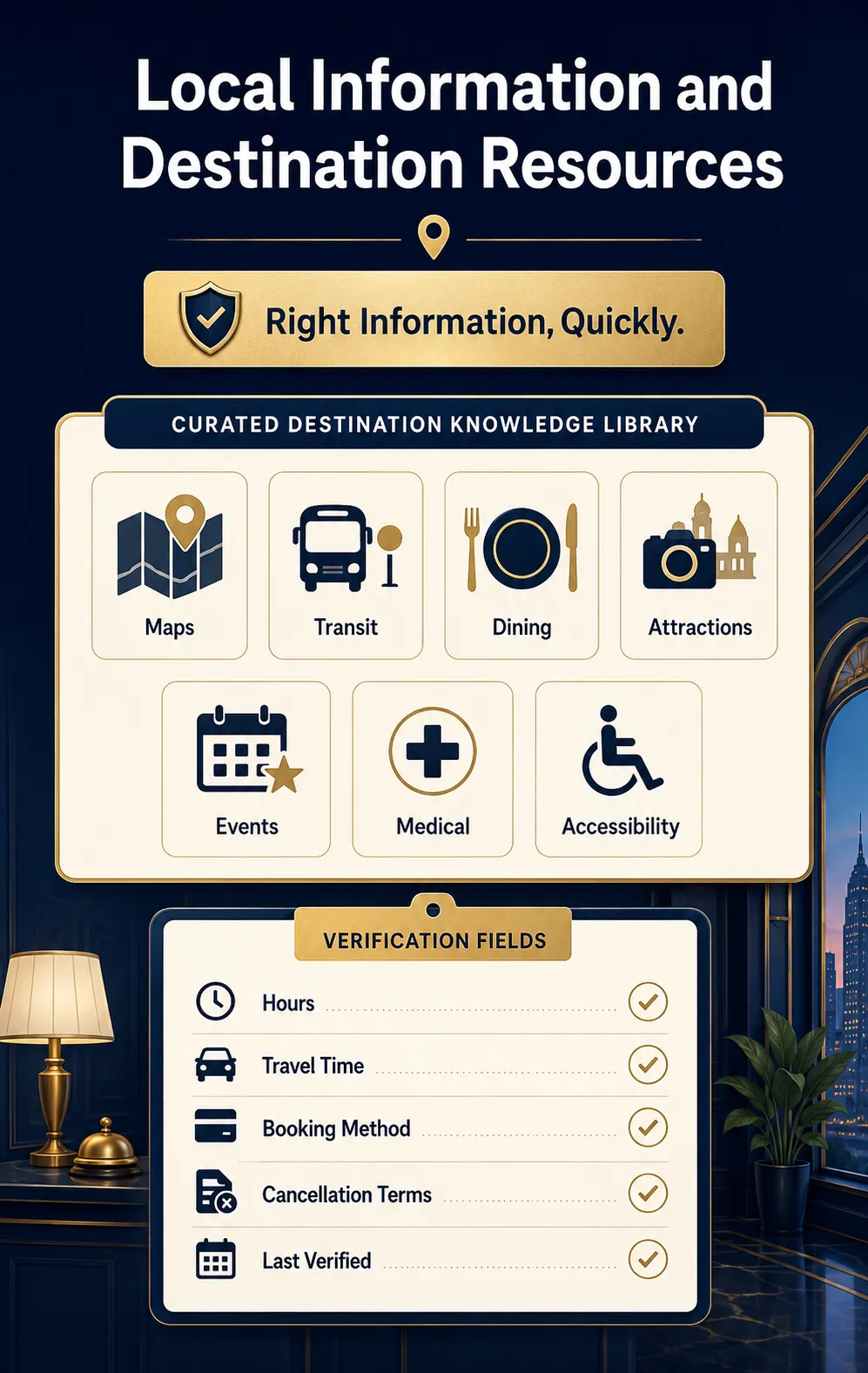
Destination knowledge is a concierge’s most visible product, so reference materials must be curated rather than accumulated. Maintain an organized library of current city maps, transit maps, neighborhood guides, attraction information, restaurant menus, cultural calendars, walking routes, medical and pharmacy contacts, places of worship, family activities, accessibility information, and options for different budgets or dietary needs.
Digital records should note practical details: location, travel time, hours, reservation method, cancellation terms, dress expectations, age restrictions, accessibility characteristics, parking, typical visit duration, and the date information was verified. Printed brochures should be reviewed on a schedule. Remove expired offers and damaged pieces immediately.
Recommendations should not depend only on paid partnerships or personal familiarity. Build a varied, defensible set of options and disclose material commercial arrangements according to hotel policy. Staff should know which vendors have been formally approved, which require waivers or deposits, and which must never be represented as hotel-operated services.
Useful presentation tools include a wall map in the back office, washable desk maps, map sleeves, fine-point markers, and a printer preset for simple customized directions. Guests often value a clearly marked route more than a thick stack of brochures. The goal is not to display the most information; it is to provide the right information quickly and confidently.
Guest Convenience Items, Loaner Equipment, and Weather Supplies
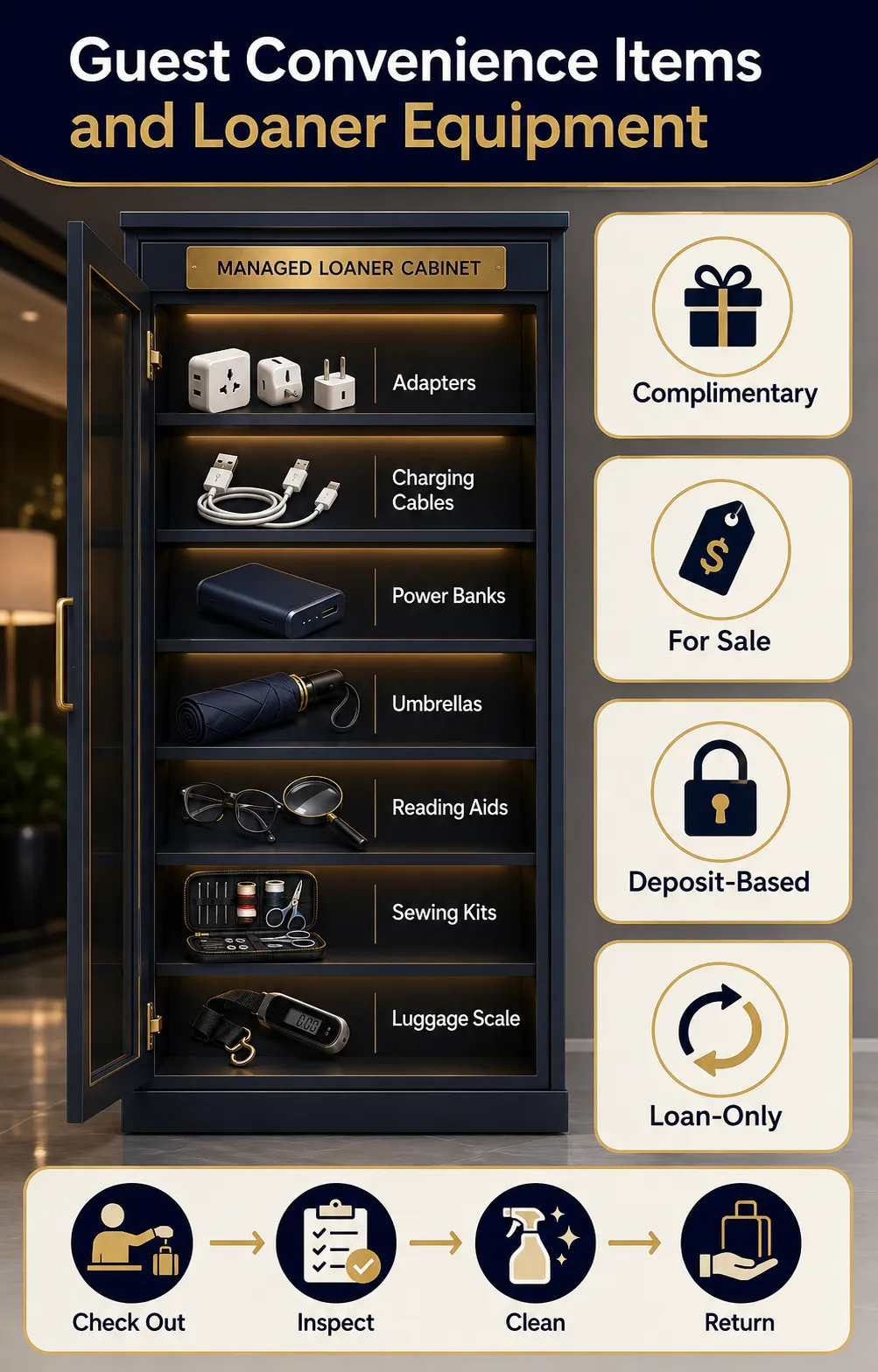
A carefully managed convenience cabinet allows the concierge to solve common travel problems without sending every guest to a store. Depending on the hotel, it may contain universal travel adapters, certified charging cables, portable power banks, umbrellas, reading glasses, magnifiers, sewing kits, stain-removal wipes, lint rollers, safety pins, basic office materials, luggage scales, and child-friendly local activity sheets. Resort or extended-stay properties may add board games, sports items, picnic accessories, or other approved equipment.
Classify items as complimentary, for sale, deposit-based, or loan-only. Every loaner should have an asset number, inspection standard, cleaning method, checkout record, expected return time, and replacement charge policy where appropriate. Store used returns separately until they are inspected and sanitized. Chargers with damaged insulation, swollen power banks, bent plugs, or uncertain certification must be removed from service.
Weather supplies should reflect local conditions. Umbrellas require a stable stand, wet-return area, drying procedure, and replenishment plan. Hot climates may justify bottled water distribution under property policy, handheld fans, sunscreen information, or heat-safety directions. Cold or wet destinations may need ponchos, ice scrapers for loan, shoe-cleaning materials, or current road-condition contacts.
Do not let a convenience program become uncontrolled clutter. Track demand for several months, remove items that are never requested, and increase par levels for high-use products. The most useful assortment is property-specific, safe, easy to explain, and reliably available.
Bell Service, Luggage Handling, Valet, and Transportation Supplies
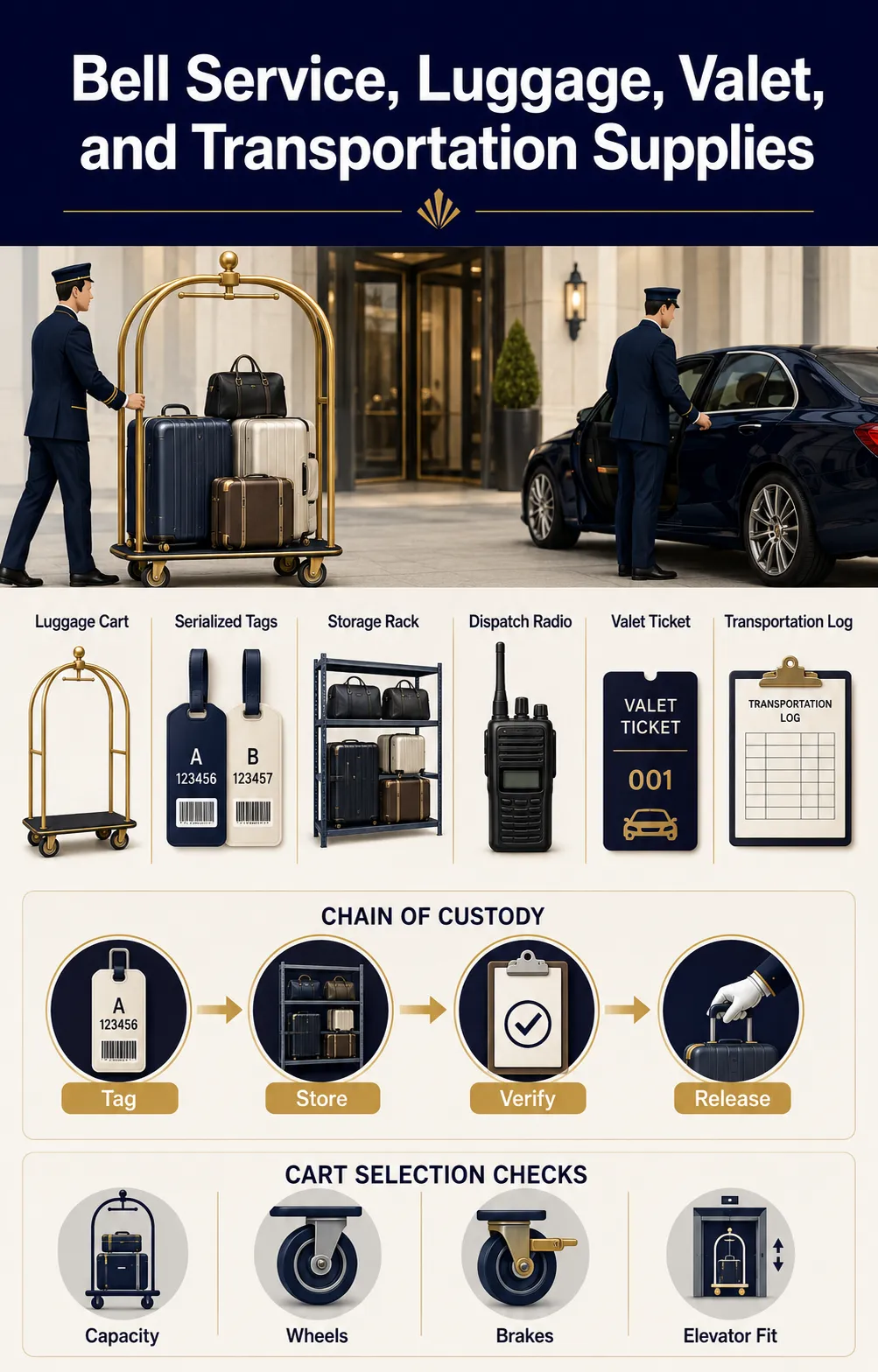
Where the concierge desk coordinates bell or arrival services, the procurement list must cover the full chain of custody. Typical items include commercial luggage carts, hand trucks where appropriate, baggage tags, serialized claim checks, permanent markers, cart covers, protective straps, garment hooks, door-protection accessories, queue signs, dispatch radios, valet tickets, key-control equipment, and transportation logs.
Select luggage carts by rated capacity, platform size, turning radius, elevator fit, wheel type, braking or control features, frame finish, bumper design, maneuverability, noise, and availability of replacement casters. Test loaded carts on the property’s actual flooring, thresholds, ramps, elevator tracks, and entrance transitions. A cart that rolls beautifully on a showroom floor may be difficult or noisy in a real hotel.
The luggage room needs durable racks, floor protection, clear zones, adequate lighting, restricted access, camera coverage where permitted, and a layout that avoids unstable stacking. Bags should be tagged before storage and released only through the hotel’s approved verification process. Never use room numbers as the sole public-facing identifier on exposed tags.
Transportation coordination supplies may include pickup boards, driver instructions, vehicle descriptions, approved vendor contacts, airport or station meeting-point diagrams, child-seat request fields, accessibility-request fields, and cancellation terms. Confirm the guest’s name, destination, pickup time, passenger count, luggage volume, contact method, price basis, and special requirements. The desk should be able to reconstruct who arranged the service and what was confirmed without relying on memory.
Secure Storage, Key Control, Payments, and Guest-Information Protection
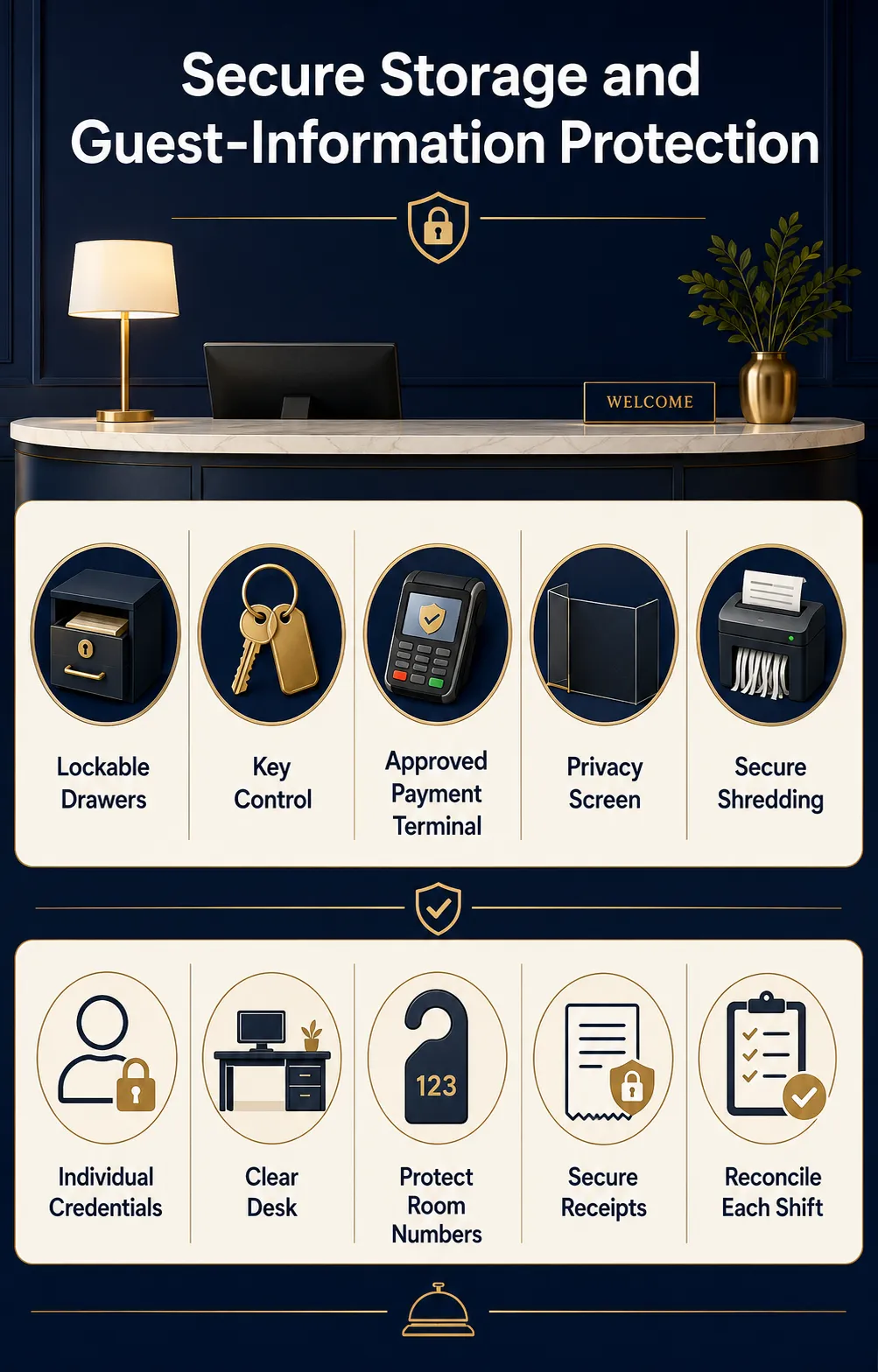
The concierge desk routinely handles information and items that should not remain visible or accessible to unauthorized people. Provide lockable drawers or cabinets for controlled forms, guest documents, keys, tickets, cash equivalents, payment devices, radios, and loaner assets. Electronic key cabinets may be justified where many physical keys or valuable items require individual accountability.
Access should follow job responsibilities. Shared keys, generic system accounts, and permanently unlocked drawers weaken accountability. Use individual credentials, automatic screen locking, controlled override procedures, and a documented key-sign-out process. Position printers so confidential pages do not sit in a public pickup tray.
If the concierge accepts payment, sells tickets, or processes deposits, use only hotel-approved terminals and procedures. Staff should not write full payment-card details on notes, store them in ordinary email, or enter them into unapproved vendor websites. Receipts and payment-related paper require secure retention and destruction. Provide a cross-cut shredder or locked destruction bin according to the property’s records policy.
Protect guest privacy during conversation as well. Avoid announcing room numbers, travel plans, celebrity names, medical needs, or special arrangements within hearing distance of others. Earpieces may help with radio privacy, but employees must still use neutral language. Paper itineraries should be handed directly to the guest or placed in a closed envelope.
Close each shift by clearing the counter, locking controlled stock, reconciling numbered documents, returning keys, securing devices, and destroying temporary notes that no longer have a legitimate business purpose. An orderly desk is not only attractive; it is a security control.
Accessibility, Inclusive Communication, and Assistance Supplies
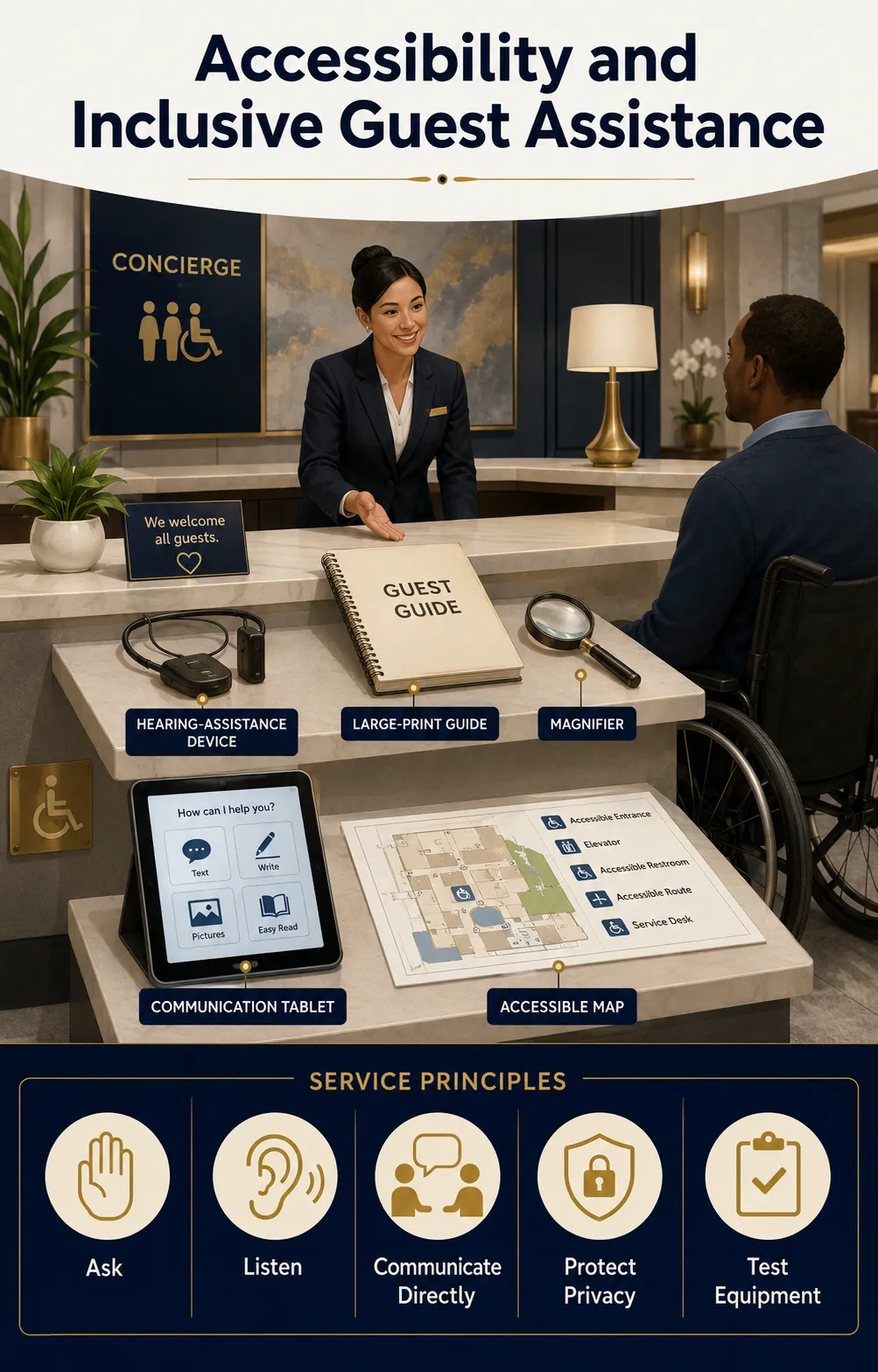
An inclusive concierge station combines accessible design, effective communication, trained employees, and practical aids. The service counter and approach must meet applicable accessibility requirements and remain unobstructed. Printed information should be readable, with clear typography and good contrast. Digital content, kiosks, and guest messaging tools should support accessible use rather than forcing every guest into one channel.
Useful equipment may include a portable or installed counter hearing system, pen and paper for short exchanges, magnification aids, large-print versions of essential information, accessible local maps, a tablet configured for approved communication services, and a telephone solution that supports guests with hearing or speech disabilities. The correct aid depends on the person, the complexity of the conversation, and the context; one device does not solve every communication need.
Keep current information on accessible transportation, step-free attractions, mobility-equipment services, accessible restaurants, medical resources, and hotel accessibility features. Verify details rather than making assumptions based on a venue’s general marketing language.
Employees should ask how they can assist, communicate directly with the guest, protect privacy, and avoid treating a companion as the default spokesperson. Test assistive devices on a routine schedule, keep batteries or receivers ready, and train each shift to locate and operate them. Accessibility supplies hidden in an unknown cabinet do not provide meaningful access.
Safety, Emergency Response, and Business-Continuity Essentials
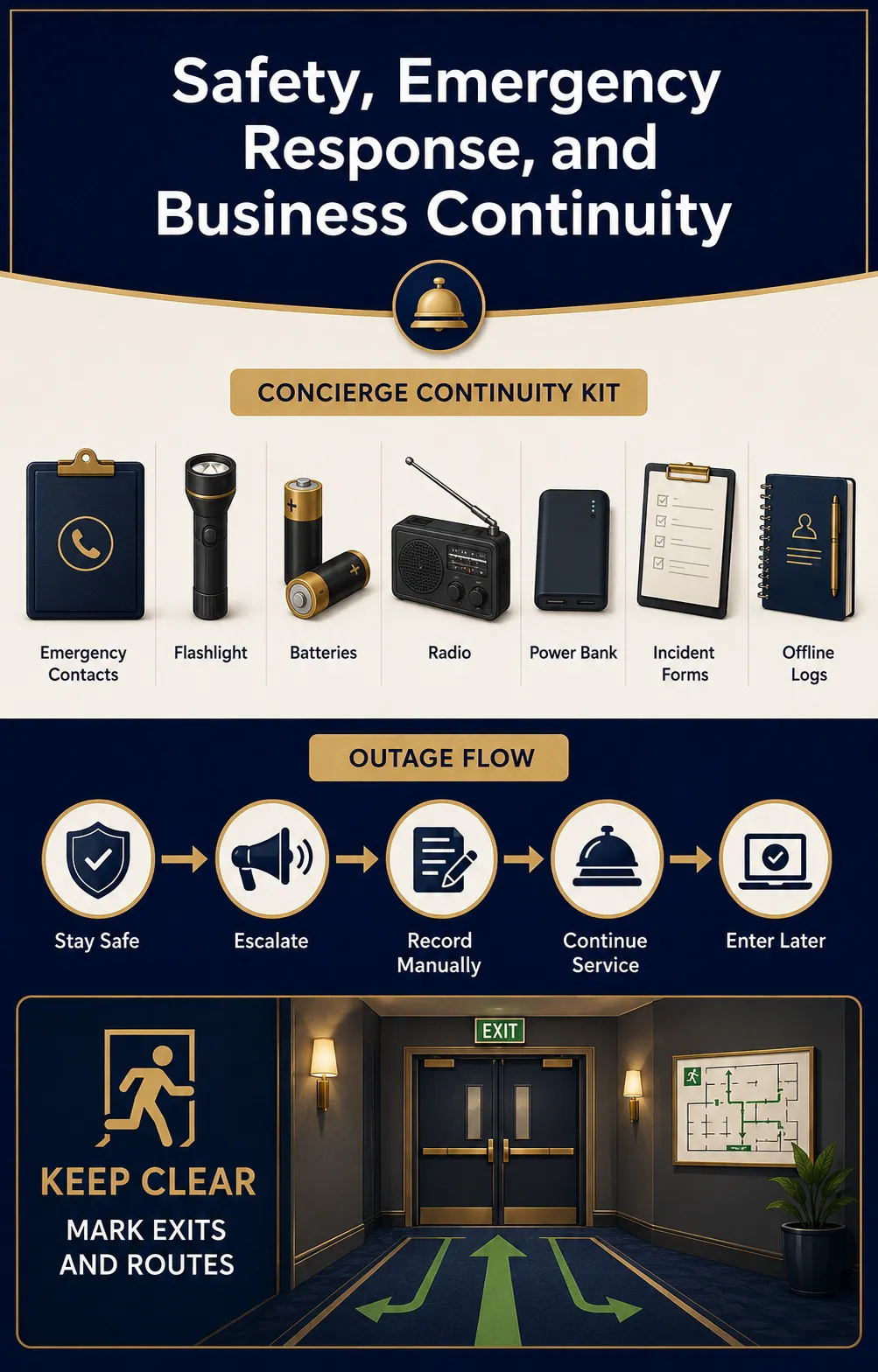
The concierge desk should support the hotel’s established emergency plan without becoming an improvised medical or security post. Keep approved internal emergency numbers, escalation contacts, evacuation and shelter procedures, utility-failure instructions, severe-weather information, and communication templates in a clearly controlled location. Staff must know when to call emergency services, security, management, or engineering.
Potential supplies include a flashlight, spare batteries, emergency radio, high-visibility vest for assigned roles, whistle if required by the plan, power bank, printed contact lists, incident forms, and accessible communication materials. First-aid supplies and automated emergency equipment should be placed, inspected, and used according to the hotel’s formal safety program; the concierge desk should know their locations even when it does not store them.
Do not obstruct exits, extinguishers, alarms, or accessible routes with luggage carts, brochure stands, deliveries, or temporary storage. Wet umbrellas, leaking bags, and crowded charging cables can create immediate hazards in a busy lobby. Include these conditions in opening and hourly visual checks.
Prepare for operational failures as well as emergencies. Define how the desk will work during internet, telephone, printer, power, or software outages. Paper request logs, updated extensions, manual vendor contacts, offline transportation records, and a later-entry procedure allow service to continue without losing accountability. Review the kit after every incident or major property change.
Cleaning, Organization, Maintenance, and Backstock Supplies
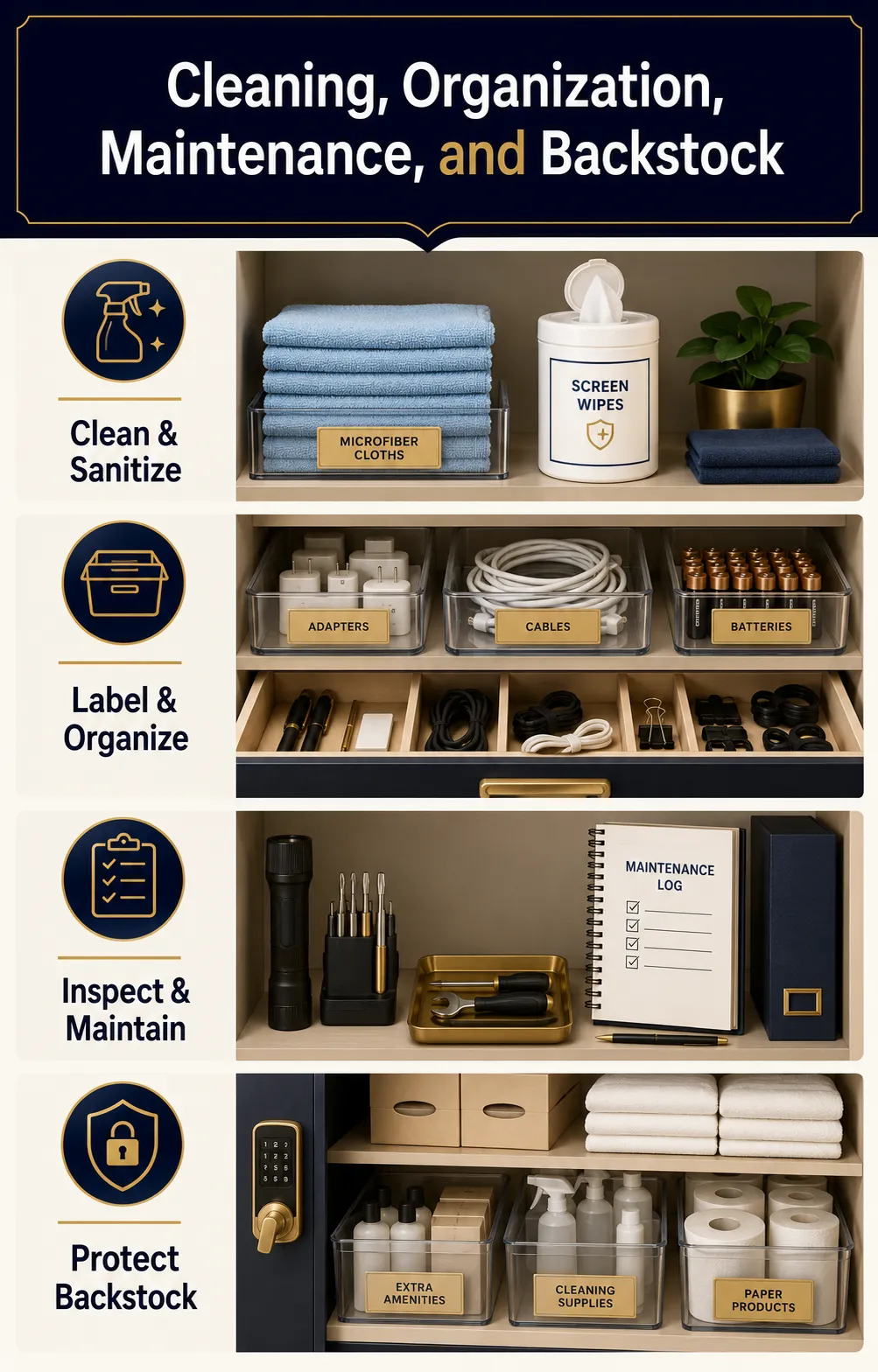
Concierge equipment is highly visible and frequently touched, so cleaning and organization should be built into procurement. Stock approved surface cleaner, microfiber cloths, screen-safe wipes, hand sanitizer where appropriate, headset-cleaning supplies, disposable gloves for handling wet or soiled returns, waste liners, and a small wet-umbrella response kit. Chemicals should remain in labeled containers and be stored away from paper, electronics, and guest loaners.
Use drawer dividers, labeled bins, vertical files, cable organizers, and clearly marked backstock shelves. Assign a home to every item. Fast service depends on employees finding a baggage tag, adapter, form, or spare radio battery without searching multiple cabinets.
Create preventive-maintenance intervals for printers, shredders, radios, chargers, hearing-assistance devices, carts, locks, and furniture hardware. Inspect cords, wheels, fasteners, brakes, batteries, and high-wear surfaces. Record defects and remove unsafe equipment rather than leaving it for the next shift.
Backstock should be protected from dust, moisture, crushing, and unauthorized use. Rotate date-sensitive items, separate new products from returns, and keep packaging or warranty information for equipment that may need service. Good storage extends useful life and keeps the guest-facing desk visually calm.
Par Levels, Reorder Points, Inventory Control, and Loss Prevention
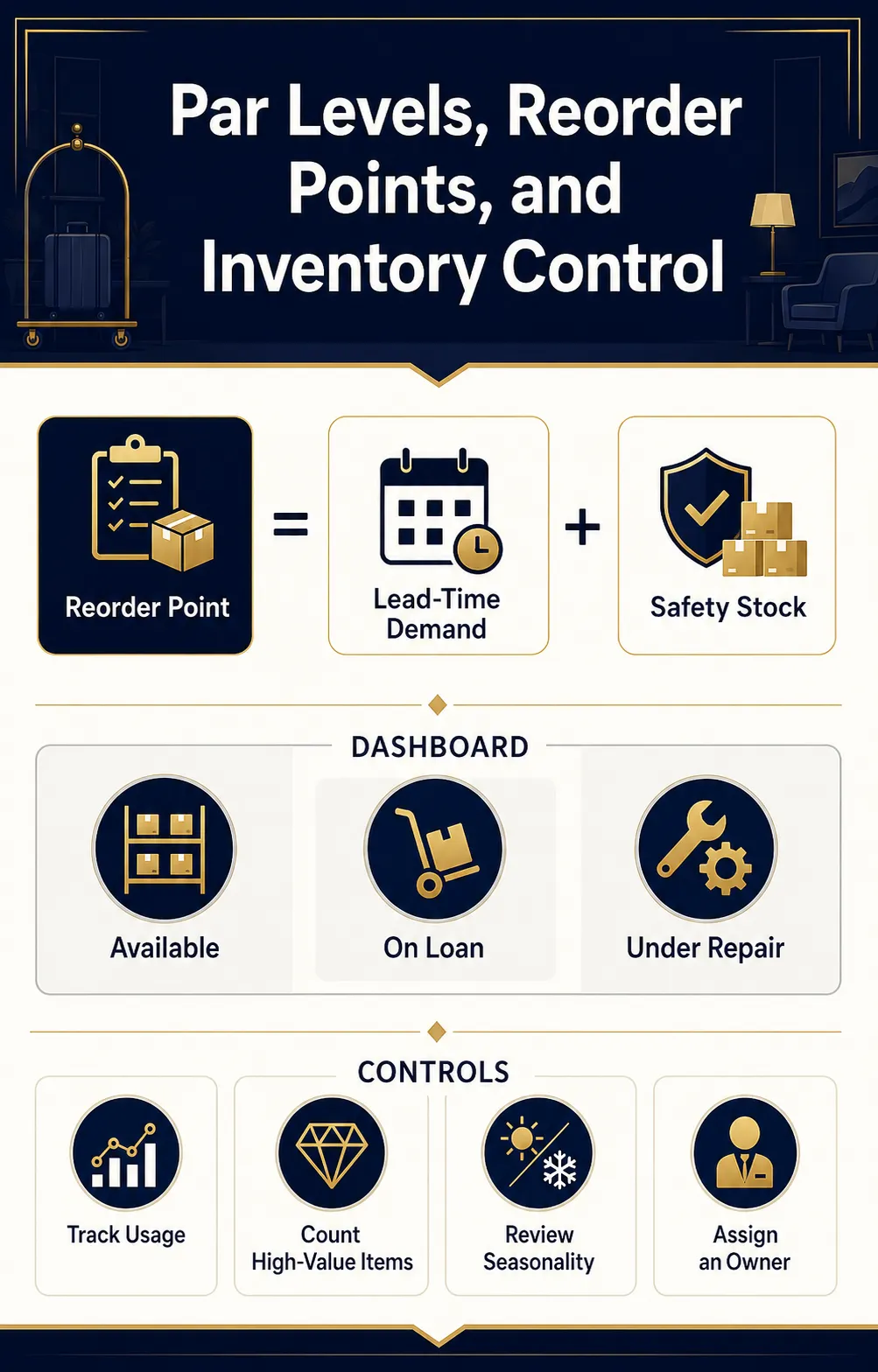
Par levels should reflect real consumption, replenishment time, occupancy, seasonality, events, and an appropriate safety buffer. Do not apply one multiplier to every category. Pens disappear gradually, printed vouchers may spike during a festival, and radio batteries fail according to age and charging cycles rather than room occupancy.
For each consumable, record average daily or weekly use, supplier lead time, minimum order quantity, storage capacity, reorder point, and emergency substitute. A practical reorder calculation is expected demand during lead time plus safety stock. Review the result after peak periods instead of treating the opening quantity as permanent.
Count high-value and high-loss items more frequently than ordinary stationery. Loaner electronics, umbrellas, tickets, transportation vouchers, cash equivalents, radios, and physical keys need numbered records or system-based tracking. Investigate repeated loss patterns before simply increasing the budget; the cause may be poor checkout, confusing storage, or an item that guests believe is complimentary.
Use a simple inventory dashboard with three signals: available, committed or on loan, and unavailable or under repair. This prevents staff from promising an item that is physically present but already reserved. Cycle counts are usually less disruptive than occasional full inventories and reveal problems earlier.
Assign one accountable owner while allowing shift supervisors to replenish critical stock. Inventory control works best when every employee can report a shortage, but one role maintains item records, supplier details, and approved substitutes.
Writing Procurement Specifications and Evaluating Suppliers
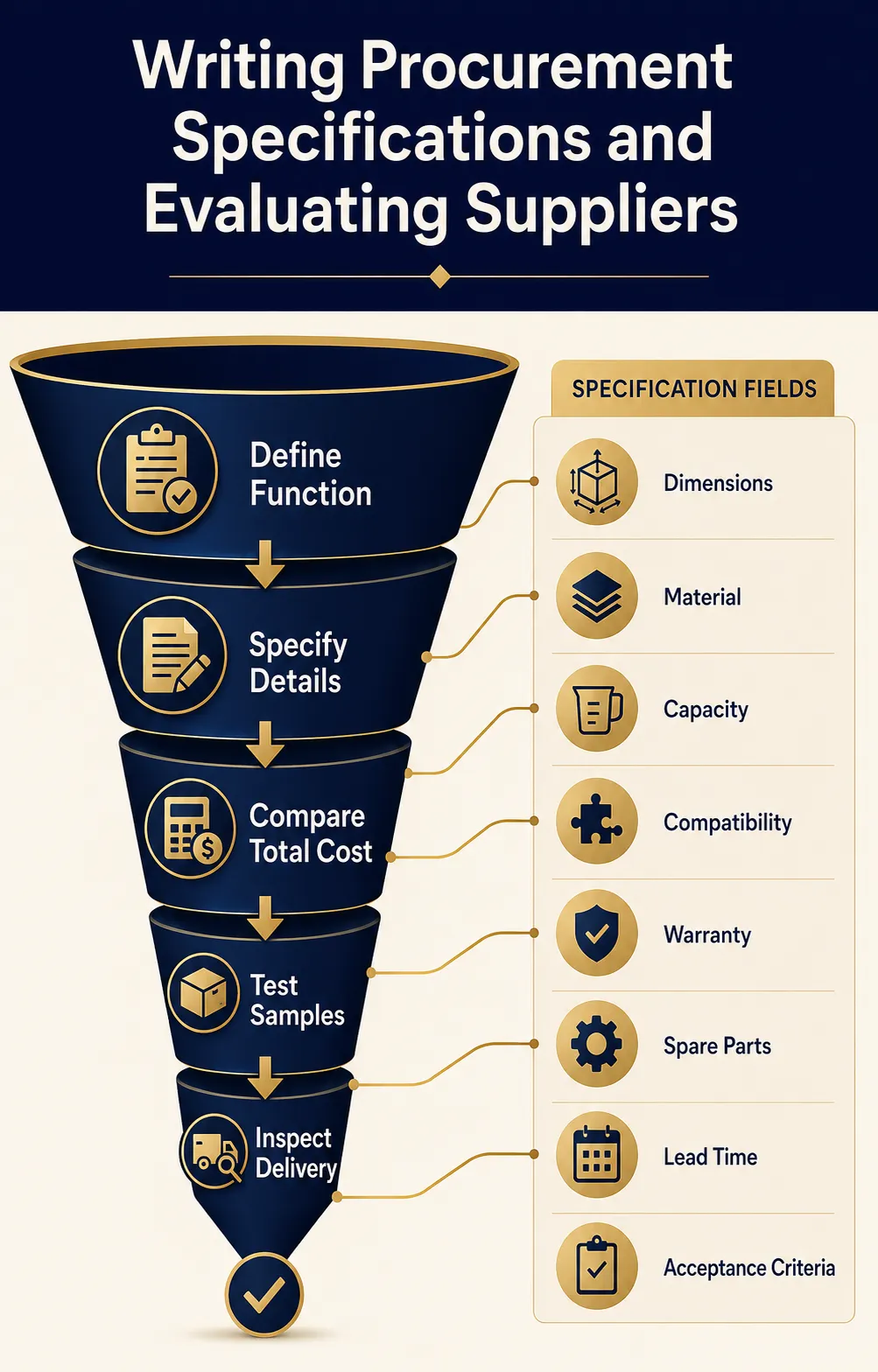
A supplier cannot price “high-quality concierge equipment” consistently. Write specifications that describe function, dimensions, material, capacity, compatibility, finish, accessibility, cleaning method, safety certification where applicable, warranty, spare parts, branding, packaging, lead time, installation, training, and acceptance criteria.
For a luggage cart, specify the platform dimensions, safe working load, wheel material and diameter, bumper coverage, height, elevator clearance, finish, garment bar, braking expectations, replacement-caster availability, and loaded maneuverability test. For a printer, define volume, document types, network environment, operating-system support, scan requirements, footprint, consumables, security functions, service response, and expected cost per page. Similar detail prevents bids for products that look comparable but perform differently.
Evaluate total cost of ownership rather than purchase price alone. Include consumables, maintenance, subscriptions, transaction fees, replacement batteries, proprietary accessories, downtime, training, shipping, installation, disposal, and expected service life. Standardization may reduce spare-parts complexity, but excessive dependence on one vendor can create pricing and supply risk.
Request samples or demonstrations for guest-facing printed items, carts, radios, charging equipment, and accessibility devices. Test them with the employees who will use them. Confirm color, branding, fit, sound, stability, cleanability, and integration before authorizing the full order.
At receiving, inspect quantities, model numbers, finish, damage, accessories, documentation, and functionality. Record serial numbers and warranty dates. A signed delivery note should not be the final acceptance test for complex equipment. Hold back approval until installation, configuration, staff training, and real-workflow testing are complete.
Build a Procurement-Ready Concierge Equipment Package
Need supplier-ready specifications? KW Hospitality can prepare and source a property-specific concierge equipment package.
Request a Custom Concierge Package
Complete Hotel Concierge Procurement and Operations Checklist
Use this checklist to plan, purchase, receive, organize, test, and maintain the supplies required for a professional hotel concierge operation. Adjust quantities and specifications according to property size, service level, operating hours, guest profile, location, peak demand, and whether concierge, bell, valet, and transportation services share the same team.
Classify every item before purchasing:
- Core: Required for normal concierge operations.
- Conditional: Required only when the property offers the related service.
- Shared: Supplied by another department but available through a documented process.
- Not Applicable: Not required for the property’s operating model.
Service Scope and Purchasing Plan
- Document the services the concierge desk will provide.
- Define desk operating hours and staffing by shift.
- Estimate peak simultaneous guest interactions.
- Identify seasonal, event-related, and group-business demand.
- Separate concierge duties from front desk, bell, valet, security, and guest-relations responsibilities.
- Identify services requiring management approval.
- Define which services are complimentary, chargeable, deposit-based, or loan-only.
- Assign an accountable owner to each supply category.
- Record the storage location for every item.
- Establish the opening quantity, operating par, safety stock, and reorder point.
- Record the approved supplier and substitute supplier.
- Document minimum order quantities and expected lead times.
- Establish a budget for setup, replacement, consumables, maintenance, and emergency purchases.
- Confirm whether each item is treated as FF&E, OS&E, a consumable, or a shared departmental asset.
- Create a procurement schedule aligned with the hotel opening or renovation timeline.
Concierge Desk, Furniture, and Guest-Facing Presentation
- Commercial-grade concierge desk or counter
- Accessible service surface at the required height
- Unobstructed accessible approach and turning space
- Adequate knee and leg clearance where required
- Durable, cleanable, and repairable counter finish
- Lockable drawers and cabinets
- Adjustable internal shelving
- Ventilated equipment compartments
- Integrated cable-management channels
- Secure openings for power and data cables
- Commercial ergonomic desk chair
- Sit-stand support where appropriate
- Anti-fatigue mat for standing positions
- Adjustable task lighting
- Monitor arm or secure monitor stand
- Keyboard and mouse support
- Desk organizers and drawer dividers
- Guest writing surface
- Concierge identification sign
- Employee nameplates
- Business-card holder
- Brochure or information display
- Stable holders with rounded, guest-safe edges
- Discreet waste container
- Clearly defined placement standard for guest-facing materials
- Daily counter-cleaning and presentation checklist
Computers, Displays, and Workstation Hardware
- Business-grade computer for every active workstation
- Commercial monitor of an appropriate size
- Second monitor for high-volume positions where justified
- Keyboard and mouse
- Privacy screen for exposed monitors
- Secure computer or device mount
- Webcam where approved and operationally required
- Document scanner or multifunction printer with scanning capability
- Label or thermal printer where required
- Barcode or QR-code scanner where used
- Approved tablet for mobile guest assistance
- Protective tablet case and secure charging dock
- Spare approved keyboard and mouse
- Asset labels for all controlled devices
- Recorded serial numbers and warranty information
- IT setup and compatibility approval
- Automatic screen-lock configuration
- Approved antivirus and endpoint-security controls
- Role-based user accounts
- Individual login credentials for every employee
- Documented password-reset and access-revocation procedures
Telephones, Radios, and Staff Communication
- Desk telephone or approved softphone
- Discreet commercial headset
- Replaceable or cleanable headset cushions
- Approved headset-cleaning supplies
- Internal telephone extension directory
- Programmable emergency and departmental contacts
- Call-transfer and hold procedures
- Voicemail configuration and monitoring responsibility
- Two-way radios where concierge coordinates mobile services
- Individual or serialized radio assignments
- Discreet earpieces
- Spare earpieces and hygiene covers
- Spare radio batteries
- Multi-unit battery charger
- Radio belt clips or protective cases
- Verified radio coverage in the lobby, entrances, luggage room, parking areas, elevators, and loading zones
- Approved communication terminology that protects guest privacy
- Backup communication procedure for telephone or radio failure
Connectivity, Power, and Business Continuity
- Wired network connection where available
- Secure staff Wi-Fi access
- Verified connectivity at every workstation
- Managed power strip
- Surge protection
- Cable labels and cable organizers
- Secured power and data connections
- Uninterruptible power supply where justified
- Backup power for critical communication devices
- Approved spare charging cables
- Approved power adapters
- Secure multi-device charging station
- Portable power banks for authorized operational use
- Inspection procedure for cables, plugs, batteries, and chargers
- Immediate removal procedure for damaged or swollen batteries
- Printed downtime instructions
- Offline request and transportation forms
- Updated internal and emergency telephone lists
- Procedure for entering offline requests after systems return
- Scheduled internet, power, printer, and system-outage drills
Concierge Software and Digital Tools
- Property-management system access
- Guest-request or service-recovery platform
- Restaurant reservation tools
- Attraction and activity booking tools
- Transportation booking or dispatch tools
- Approved guest-messaging platform
- Concierge email account
- Shared team calendar
- Internal knowledge base
- Shift-handoff system
- Vendor and partner directory
- Package, baggage, or loaner tracking system where applicable
- Lost-and-found referral or tracking access
- Secure payment system where transactions are accepted
- Reporting dashboard for request volume and completion time
- Role-based permissions for every platform
- Audit trail for high-risk or chargeable transactions
- Escalation rules for overdue requests
- Backup owner for time-sensitive requests
- Multilingual templates for common guest communications
- Central process for updating operating hours, prices, cancellation terms, and destination information
- Scheduled review of inactive accounts and unnecessary permissions
- Approved offline procedure for every critical system
Printer, Scanner, and Document Supplies
- Network printer or multifunction printer
- Correct printer paper sizes
- Branded letterhead
- Card stock
- Envelopes in required sizes
- Toner or ink cartridges
- Spare printer consumables
- Thermal or receipt rolls where required
- Label rolls where required
- Ticket or voucher stock
- Printer-cleaning supplies
- Document scanner
- Secure location for printed confidential documents
- Procedure for removing abandoned printouts
- Printer maintenance schedule
- Approved service contact and response time
- Manual forms for printer outages
Stationery and General Office Supplies
- Black pens
- Blue pens
- Pencils
- Permanent markers
- Dry-erase markers
- Highlighters
- Notepads
- Sticky notes
- Paper clips
- Binder clips
- Rubber bands
- Stapler
- Spare staples
- Staple remover
- Scissors
- Adhesive tape
- Tape dispenser
- Ruler or measuring tape
- Folders
- Document wallets
- File dividers
- Clipboards
- Name-label supplies
- Approved temporary signage materials
- Date stamp where required
- “Received,” “Paid,” or controlled transaction stamps where approved
- Lockable storage for numbered or controlled stationery
Forms, Logs, and Controlled Documents
- Guest-request form
- Restaurant reservation confirmation form
- Transportation request and confirmation form
- Airport-transfer log
- Vendor booking record
- Ticket or voucher issuance log
- Baggage storage record
- Serialized baggage claim checks
- Loaner-item agreement
- Loaner checkout and return log
- Lost-and-found intake or referral form
- Package-handling record
- Valet ticket and key log where applicable
- Incident-referral form
- Guest complaint and escalation form
- Shift-handoff checklist
- Opening checklist
- Midshift readiness checklist
- Closing checklist
- Inventory-count sheet
- Defect and maintenance report
- Vendor-information update form
- Downtime request log
- Document-retention schedule
- Secure destruction procedure
- Numbering and reconciliation process for controlled forms
Destination Information and Local Resources
- Current city and neighborhood maps
- Public transportation maps
- Walking and driving directions
- Restaurant directory
- Current restaurant menus
- Attraction and activity directory
- Cultural and entertainment calendar
- Shopping information
- Family and child-friendly activities
- Business and conference services
- Places of worship
- Pharmacy and medical contacts
- Emergency medical locations
- Accessible transportation information
- Step-free attractions and accessible venues
- Dietary and allergen-friendly dining options
- Pet-friendly venues where relevant
- Transportation providers
- Airport, station, and port information
- Current travel-time estimates
- Parking information
- Dress-code and age-restriction details
- Operating hours
- Reservation and cancellation requirements
- Typical visit duration
- Approved vendor status
- Commercial relationship disclosure where required
- Last-verification date for every listing
- Scheduled review and removal of expired information
- Back-office wall map
- Washable desk map
- Map sleeves
- Fine-point route markers
- Printer template for customized directions
Ticketing, Reservations, and Vendor Transactions
- Approved restaurant and attraction partners
- Current vendor contact information
- Primary and emergency vendor contacts
- Documented booking method
- Prices or price basis
- Deposit requirements
- Cancellation and refund terms
- Commission or commercial-arrangement disclosure
- Insurance or licensing records where required
- Accessibility information
- Pickup and meeting-point instructions
- Vendor complaint and escalation procedure
- Booking-confirmation template
- Closed envelope or ticket wallet
- Numbered vouchers or claim checks
- Secure storage for live tickets and cash-equivalent documents
- Daily reconciliation of issued and unused documents
- Procedure for disputed charges, cancellations, and no-shows
- Routine verification of changing prices, schedules, and terms
Guest Convenience and Loaner Supplies
Select these items according to guest profile, location, climate, and service promise.
- Universal travel adapters
- Certified charging cables
- Secure guest charging station
- Portable power banks
- Umbrellas
- Stable umbrella stand
- Wet-umbrella bags or controlled drying area
- Reading glasses
- Magnifying glasses
- Luggage scale
- Sewing kits
- Safety pins
- Lint rollers
- Stain-removal wipes
- Basic office supplies for guest use
- Child-friendly activity sheets
- Board games where appropriate
- Approved sports or recreation equipment
- Picnic or beach accessories where appropriate
- Rain ponchos
- Handheld fans in hot climates
- Cold-weather assistance items where appropriate
- Shoe-cleaning supplies
- Local weather and road-condition information
For every loaner item:
- Assign an asset or inventory number.
- Define whether the item is complimentary, chargeable, deposit-based, or loan-only.
- Record the guest, room or approved identifier, employee, checkout time, and expected return time.
- Define the replacement-charge policy.
- Inspect the item before and after use.
- Establish an approved cleaning or sanitizing procedure.
- Separate returned items until inspection is complete.
- Record damage, missing parts, and repair status.
- Remove unsafe equipment from service immediately.
- Track available, reserved, issued, cleaning, damaged, and under-repair quantities.
Accessibility and Inclusive Communication Supplies
- Accessible concierge counter and approach
- Clear path free from bags, signs, furniture, and brochure stands
- High-contrast and readable printed materials
- Large-print versions of essential information
- Magnification aids
- Pen and paper for short written exchanges
- Portable or installed hearing-assistance system
- Charged receivers and spare batteries
- Approved tablet for communication assistance
- Accessible telephone solution
- Accessible local maps and destination guides
- Accessible transportation provider directory
- Step-free attraction information
- Mobility-equipment rental and repair contacts
- Medical and assistance-service contacts
- Multilingual communication resources
- Routine functionality testing for assistive equipment
- Cleaning and storage procedure for shared devices
- Staff training on respectful, direct communication
- Procedure for documenting and prioritizing accessibility requests
- Backup arrangements when an accessible vendor is unavailable
Bell Service and Luggage-Handling Supplies
Include this category when concierge staff manage or coordinate bell and luggage services.
- Commercial luggage carts
- Hand trucks where appropriate
- Garment hooks
- Protective straps
- Cart covers where required
- Non-marking bumpers
- Quiet commercial casters
- Braking or control features where required
- Spare replacement casters
- Baggage tags
- Serialized claim checks
- Permanent markers
- Secure luggage racks
- Defined storage zones
- Floor and wall protection
- Adequate luggage-room lighting
- Restricted-access control
- Camera coverage where permitted
- Package and baggage scales where required
- Oversized-item handling procedure
- Damaged-baggage documentation procedure
- Long-term storage approval process
- Identity-verification procedure before baggage release
- Daily cart inspection
- Loaded maneuverability testing
- Testing on actual flooring, ramps, thresholds, entrance transitions, and elevator tracks
- Confirmation that every cart fits the property’s elevators and storage areas
Valet and Transportation Supplies
Include this category when concierge staff arrange or oversee transportation.
- Approved transportation provider list
- Airport-transfer booking form
- Vehicle dispatch log
- Guest pickup confirmation
- Driver identification and contact record
- Vehicle description and license information where required
- Passenger and luggage-capacity record
- Accessible vehicle request process
- Child-seat request process
- Pricing and payment terms
- Cancellation and waiting-time policy
- Meeting-point instructions
- Transportation signage
- Valet tickets
- Key tags
- Secure key cabinet
- Key checkout and return log
- Reflective vests for assigned employees
- Flashlights for evening operations
- Weather-protection supplies
- Queue and vehicle-direction signs
- Incident and damage report
- Emergency transportation backup
- Procedure for delayed, missing, or incorrect vehicles
- Shift reconciliation of keys, tickets, and unresolved trips
Secure Storage, Privacy, and Payment Controls
- Lockable drawers
- Lockable cabinets
- Restricted key cabinet
- Secure storage for tickets and vouchers
- Secure storage for guest documents
- Secure storage for payment terminals
- Secure storage for radios and loaner electronics
- Individual access credentials
- Controlled override procedure
- Physical key sign-out process
- Automatic screen locking
- Monitor privacy filters where needed
- Printer placement away from public access
- Closed envelopes for guest itineraries and confidential documents
- Cross-cut shredder or locked destruction container
- Records-retention and destruction policy
- Approved payment terminal
- Tamper inspection for payment devices
- Prohibition on recording full payment-card information on paper
- Prohibition on storing payment details in ordinary email or notes
- Procedure for payment disputes and refunds
- Neutral radio terminology that does not expose guest information
- Procedure for protecting room numbers and travel plans
- End-of-shift document clearing and controlled-stock reconciliation
- Routine access and privacy audit
Safety and Emergency Supplies
- Approved emergency contact list
- Internal escalation directory
- Evacuation instructions
- Shelter-in-place instructions
- Fire, utility, weather, and security procedures
- Emergency communication templates
- Flashlight
- Spare flashlight batteries
- Emergency radio
- Approved power bank
- High-visibility vest for assigned roles
- Whistle where required by the emergency plan
- Incident forms
- Accessible emergency communication materials
- Current locations of first-aid kits
- Current locations of automated emergency equipment
- Current locations of extinguishers and alarm points
- Procedure for contacting emergency services
- Severe-weather and road-condition information
- Process for handling wet umbrellas and leaking luggage
- Routine inspection of exits and accessible routes
- Rule prohibiting carts, deliveries, signs, and storage from blocking emergency equipment
- Scheduled emergency and business-continuity drills
- Post-incident review and replenishment process
Cleaning, Organization, and Maintenance Supplies
- Approved surface cleaner
- Microfiber cloths
- Screen-safe wipes
- Hand sanitizer where appropriate
- Headset-cleaning supplies
- Disposable gloves for wet or soiled returns
- Waste liners
- Wet-umbrella response supplies
- Labeled secondary chemical containers
- Separate chemical storage away from electronics and paper
- Drawer dividers
- Labeled storage bins
- Vertical file organizers
- Cable organizers
- Backstock shelving
- Cleaning schedule for high-touch surfaces
- Preventive-maintenance schedule for printers and shredders
- Preventive-maintenance schedule for radios and chargers
- Preventive-maintenance schedule for carts and casters
- Preventive-maintenance schedule for locks and furniture hardware
- Preventive-maintenance schedule for accessibility devices
- Defect-reporting process
- Quarantine area for damaged or unsafe equipment
- Protected storage for warranty records and spare parts
- Rotation system for date-sensitive supplies
- Separation of new stock, returned items, damaged items, and items awaiting cleaning
Inventory, Par Levels, and Reorder Controls
For every item, record:
- Item name and unique SKU
- Category and service function
- Core, conditional, shared, or not-applicable status
- Setup quantity
- Normal operating par
- Peak-demand par
- Safety stock
- Quantity currently available
- Quantity reserved or issued
- Quantity under cleaning or inspection
- Quantity damaged or under repair
- Average daily or weekly consumption
- Supplier lead time
- Minimum order quantity
- Reorder point
- Approved substitute
- Storage location
- Unit cost and replacement cost
- Supplier contact information
- Warranty and service information
- Last count date
- Accountable inventory owner
Use the following calculations where applicable:
Opening quantity = Setup quantity + Operating par + Replacement reserve
Reorder point = Expected demand during lead time + Safety stock
Loaner quantity = Peak simultaneous demand + Cleaning and repair buffer
Additional controls:
- Count high-value and high-loss items daily or by shift.
- Count critical consumables according to usage and lead time.
- Conduct routine cycle counts.
- Investigate repeated loss before increasing par levels.
- Review stock levels before local events and seasonal demand changes.
- Recalculate quantities after actual operating data becomes available.
- Assign one accountable inventory owner.
- Permit designated supervisors to replenish critical items.
- Record all emergency purchases and approved substitutions.
Procurement Specifications and Supplier Evaluation
For every significant item, define:
- Intended operational function
- Required dimensions
- Capacity or safe working load
- Material and construction
- Finish and color
- Commercial durability requirements
- Cleanability and chemical compatibility
- Accessibility requirements
- Electrical or software compatibility
- Required safety certifications
- Branding or customization requirements
- Packaging standard
- Required spare parts
- Warranty duration and coverage
- Service response expectation
- Installation responsibility
- Configuration responsibility
- Staff-training requirement
- Sample or demonstration requirement
- Production lead time
- Shipping and delivery terms
- Acceptance criteria
- Rejection and corrective-action procedure
- Expected service life
- Total cost of ownership
Supplier evaluation should include:
- Product conformity
- Commercial-hospitality experience
- Quality-control process
- Compliance documentation
- Warranty support
- Replacement-part availability
- Lead-time reliability
- Minimum order requirements
- Customization capability
- Packaging quality
- Training and installation support
- References or documented project experience
- Financial and operational stability
- Data-security controls where software or payment systems are involved
- Total landed cost
- Emergency replacement capability
- Backup supplier availability
Receiving, Inspection, and Acceptance
- Compare deliveries with the approved purchase order.
- Verify model numbers and item codes.
- Count all units and accessories.
- Inspect packaging and visible damage.
- Confirm dimensions, materials, color, and finish.
- Compare guest-facing products with approved samples.
- Test stability, maneuverability, sound, and cleanability.
- Test hardware and software compatibility.
- Confirm cables, chargers, batteries, manuals, and accessories.
- Record serial numbers.
- Record warranty start and expiration dates.
- Photograph discrepancies.
- Quarantine nonconforming or damaged items.
- Notify the supplier within the required claim period.
- Track repair, replacement, credit, or approved acceptance.
- Complete installation and configuration.
- Train employees before operational handover.
- Test equipment under realistic workload.
- Obtain department-owner approval.
- Do not treat a signed delivery note as final operational acceptance.
Pre-Opening Readiness Test
Before opening, confirm that the team can successfully complete each scenario:
- Provide accurate local directions.
- Make and document a restaurant reservation.
- Arrange and confirm an airport transfer.
- Request a wheelchair-accessible vehicle.
- Issue and recover a guest loaner item.
- Store and correctly release a guest bag.
- Issue and reconcile a ticket or voucher.
- Process an approved payment or deposit.
- Protect confidential guest information.
- Replace printer paper or toner.
- Respond to a damaged charging cable.
- Locate and operate an accessibility aid.
- Handle a missing vendor confirmation.
- Continue operations during an internet outage.
- Continue operations during a printer failure.
- Continue operations during a telephone or software outage.
- Escalate an urgent guest request.
- Complete a shift handoff without losing open requests.
- Reconcile keys, tickets, vouchers, radios, and controlled assets.
- Close and secure the concierge desk correctly.
Daily Opening Checklist
- Clean and organize the guest-facing counter.
- Confirm that the accessible service area is clear.
- Start and test computers, phones, printers, and software.
- Confirm network and communication availability.
- Check paper, toner, labels, and required forms.
- Confirm that radios and loaner devices are charged.
- Review unresolved requests from the previous shift.
- Verify important transportation and vendor bookings.
- Check current weather, transportation, and local-event information.
- Confirm availability of high-demand loaner items.
- Inspect controlled keys, tickets, vouchers, and payment equipment.
- Check the luggage room and storage areas.
- Confirm emergency contacts and downtime materials are accessible.
- Report shortages, damage, or system problems before peak service begins.
Shift-Handoff Checklist
- Review every open guest request.
- Identify urgent or time-sensitive commitments.
- Confirm assigned owners and promised completion times.
- Transfer vendor confirmations and contact details.
- Report guest communication preferences.
- Record loaner items currently issued.
- Record baggage awaiting collection.
- Transfer active transportation arrangements.
- Report equipment failures and workarounds.
- Report shortages and emergency substitutions.
- Reconcile controlled documents and keys.
- Confirm that confidential temporary notes are secured or destroyed.
- Obtain acknowledgment from the incoming employee or supervisor.
Daily Closing Checklist
- Complete or formally transfer unresolved requests.
- Reconcile tickets, vouchers, claim checks, and controlled forms.
- Reconcile physical keys and payment devices.
- Record outstanding loaner items.
- Secure guest documents and controlled stock.
- Clear confidential information from the counter and printer.
- Destroy temporary notes according to policy.
- Charge radios, tablets, power banks, and loaner devices.
- Remove damaged equipment from service.
- Replenish critical supplies.
- Clean guest-facing and high-touch surfaces.
- Check that exits and accessible routes are unobstructed.
- Lock drawers, cabinets, devices, and storage rooms.
- Complete the final shift report.
- Notify the responsible manager of urgent shortages or unresolved risks.
Final Management Approval
Before the concierge operation is approved for service, verify that:
- All required items have been purchased and received.
- Quantities match the approved operating plan.
- Critical backup supplies are available.
- Equipment has passed operational testing.
- Software permissions are correct.
- Staff have completed required training.
- Accessibility equipment is available and functional.
- Security and privacy controls are active.
- Emergency and downtime procedures have been tested.
- Inventory owners and reorder responsibilities are assigned.
- Supplier, warranty, and maintenance records are complete.
- Opening, shift-handoff, and closing checklists are in use.
- Defects and incomplete items have documented corrective actions.
- The concierge manager, front-office leader, IT, security, procurement, and other responsible departments have signed off.
A concierge desk is operationally ready only when every item has a defined purpose, quantity, owner, storage location, inspection standard, and replenishment process. The final objective is not to purchase the largest possible assortment. It is to create a controlled, accessible, secure, and resilient service environment that allows employees to respond quickly and confidently to real guest needs.
A Well-Stocked Concierge Desk That Supports Exceptional Service
A Well-Stocked Concierge Desk That Supports Exceptional Service
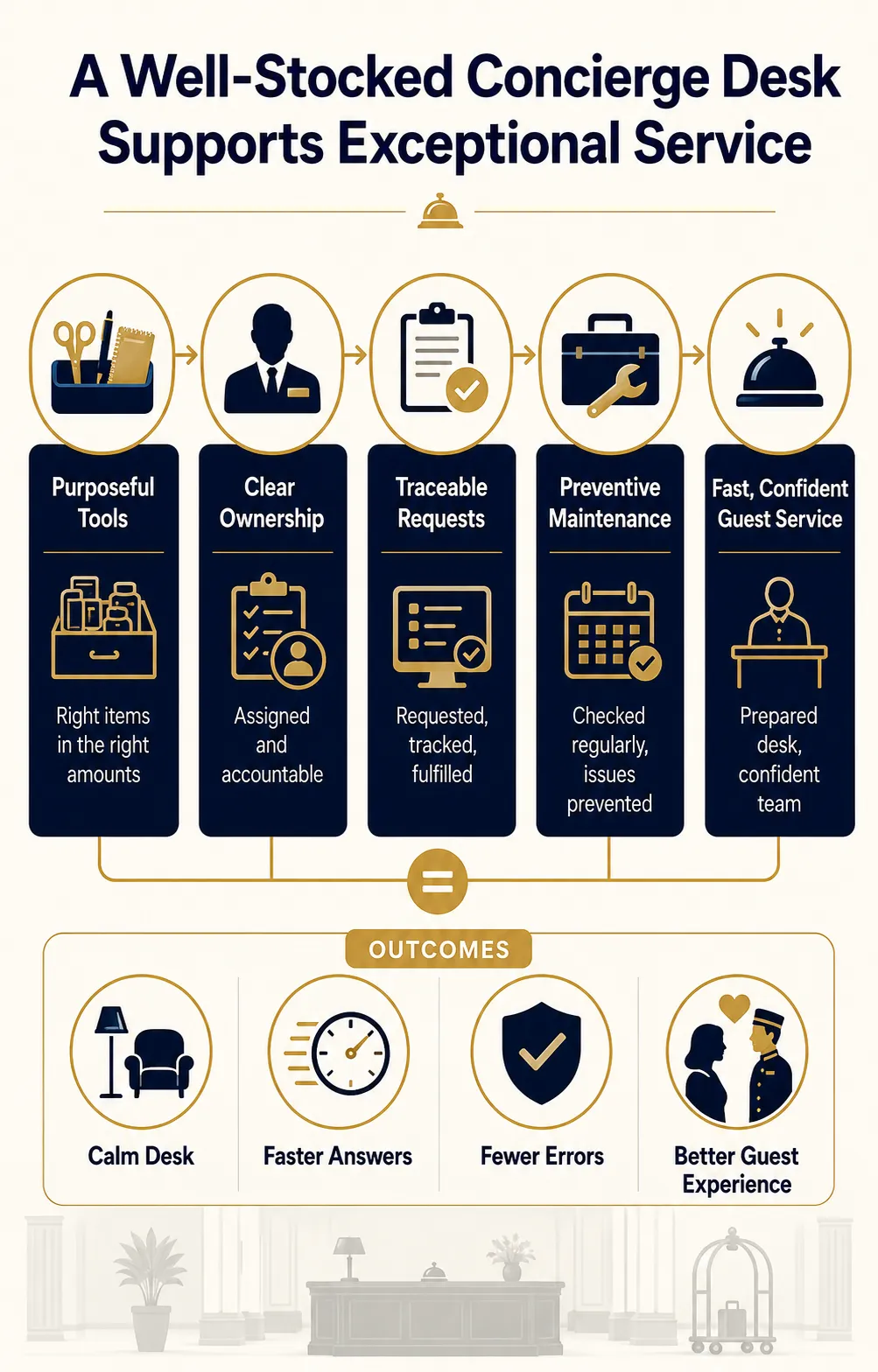
The strongest concierge operation is not the one with the most products. It is the one in which every tool has a purpose, every controlled item has an owner, every request has a traceable workflow, and every employee can deliver service without hunting for information or improvising unsafe solutions.
Build the supply program around guest needs and property operations, then support it with clear specifications, acceptance testing, secure storage, par levels, preventive maintenance, and disciplined shift checks. Review usage regularly as guest behavior, technology, local partners, and the hotel’s service model change.
When procurement is handled this way, the desk remains visually composed even during peak periods. Guests experience quick answers and confident assistance; employees experience a workplace designed to help them succeed. That is the real purpose of a complete hotel concierge supply checklist.
Frequently Asked Questions About Hotel Concierge Supplies
What are the most essential hotel concierge supplies?
The core supplies are a functional and accessible desk, computer, telephone, printer or scanner access, approved concierge and guest-request software, stationery, secure storage, current destination information, transportation contacts, request forms, and a documented shift-handoff system. Properties that manage luggage, valet, tickets, payments, umbrellas, or loaner electronics need additional controlled equipment for those services.
How is a concierge supply list different from a front desk supply list?
Front desk supplies primarily support reservations, registration, room assignment, payment, and check-in or checkout. Concierge supplies focus on destination guidance, reservations, transportation, entertainment, special requests, guest convenience, and personalized coordination. The two functions may share technology and stationery, especially in smaller hotels, but responsibilities and controlled forms should still be clearly defined.
How many concierge workstations does a hotel need?
Base the number on peak simultaneous demand, operating hours, lobby traffic, room count, group business, and the tasks performed at the desk. Consider how long typical interactions last and whether staff can serve guests from mobile devices during surges. Provide enough positions for peak service without building permanent counters that obstruct circulation during ordinary periods.
Should a hotel provide guest charging cables and adapters?
They can be valuable convenience items when managed as a formal program. Use commercially appropriate, inspected products; define compatibility, checkout, return, cleaning, storage, and replacement rules; and immediately remove damaged equipment. Purpose-built secured charging stations may be safer and easier to control than a drawer of loose, unverified cables.
What information should a concierge keep about local vendors?
Maintain services offered, contacts, booking method, operating hours, typical lead time, prices or price basis, cancellation terms, accessibility details, insurance or approval status where relevant, payment method, pickup procedure, emergency contact, and the last verification date. Also record complaint and escalation routes. Staff should distinguish approved partners from general suggestions.
How should luggage and loaner items be tracked?
Use serialized tags or asset numbers linked to a record showing the guest, item, date and time, employee, storage location, expected return or release condition, and final disposition. Avoid displaying sensitive guest details on exposed tags. Counts should distinguish available, issued, reserved, damaged, and under-repair items.
How often should concierge inventory be reviewed?
Check critical consumables and high-value loaners daily or by shift. Count ordinary office stock weekly or according to usage, and perform a broader monthly review of par levels, defects, losses, slow-moving items, and supplier performance. Seasonal hotels should reassess quantities before major demand changes and local events.
Which supplies should not be stored at the concierge desk?
Avoid unnecessary cash, uncontrolled keys, exposed guest records, unapproved payment devices, personal chargers, unlabeled chemicals, expired brochures, unsafe batteries, excessive bulk stock, and medical products outside the hotel’s approved program. Equipment that blocks circulation, exits, fire-safety devices, accessible routes, or sightlines also belongs elsewhere.
What should be included in a concierge desk downtime kit?
Include blank request and transportation forms, current internal extensions, critical vendor and emergency contacts, shift-handoff pages, writing supplies, a flashlight, an approved power bank, basic guest information, and instructions for later system entry. Test the process during drills so employees know how to preserve timestamps, ownership, privacy, and follow-up during an outage.
How can hotels control the cost of concierge supplies?
Standardize frequently used items, calculate par levels from consumption and lead time, track loss, compare total ownership cost, maintain equipment, and avoid overprinting changeable information. Purchase durable commercial products where failure would interrupt service, but do not pay for features the workflow will not use. Regular usage reviews provide better savings than indiscriminate budget cuts.